Friday, 17 November 2017

Lesson 12: ICT Project for Social Change

At the end of this lesson, the students should be able to:
  1. Plan and conceptualize an ICT project for social change; and
  2. identify the platforms that will help in the success of the campaign.
Creating a Concept Paper

Before starting your project, your group should be able to do the necessary paperwork. This allows experts to see if your project is doable over the time frame that was given and if it is significant enough to be made into reality

A concept paper is a document used to convince a panel of potential funders to help a product, program, or service become a reality. This is very important as this concept paper will be the basis whether they approve of your project or not.

There are 5 elements of a concept paper:

1. Introduction-includes your group's mission, vision, and a brief introduction of your project
2. Purpose-includes the reasons why this project is worth your group and sponsor's time, effort, and money.
3. Description- includes all the necessary information about the project. In ICT, it involves the sites you are going to produce and the purpose of each and how they work in unison.
4. Support-contains the budget needed for the project. Some concept papers do not specify any amount requested from the sponsor. 
5. Contact information- includes information on how the group can be contacted.


ICT Project Process Overview

1. Planning- involves:
  • Conceptualizing your project
  • Researching on available data about your topic
  • Setting deadlines and meetings
  • Assigning people to various tasks
  • Finding a web or blog host
  • Creating a site map for your website
  • Listing down all applications that you need including web apps
  • Funding (if applicable)
You need to make sure that you have different back-up plans in case something does happen.  Thus, creating these plans are included in the planning step.

2. Development- involves actual creation and production of sites, infographics, etc.
3. Release and Promotion- involves the actual release of the website for public view and promoting it. Promotion typically starts before the actual release. You can make use of different platforms to advertise your project, such as Facebook, Twitter, etc. 
4. Maintenance- involves responding to feedback of your site visitors and continuing to improve the website.

You can make use of suggestion forms in your site to know what you should add or remove in your site.

I hope that in this lesson, everyone will learn how to use ICT for social change.

Friday, 10 November 2017

Lesson 11: ICT as Platform for Change

       Throughout recent history, the Philippines has been one of a few nations that demonstrates unity for a call to action or social change. These campaigns for social change would not have been successful if it were not for ICT.


EDSA (People Power Revolution)


A video with the song "Handog ng Pilipino sa Mundo" which is one of the most iconic songs which represents the People Power Revolution.

        The People Power Revolution lasted from 1983 to 1986. During a radio broadcast of Radyo Veritas, Cardinal Sin encouraged the Filipinos to help end the regime of then President Ferdinand Marcos. A major protest took place alng EDSA from February 22 to 25,1986 involving two million Filipinos from different sectors. These included civilians, political parties, the military, and religious groups. The radio broadcast helped change the course of history. Without it, Filipinos would not have been moved into action.

EDSA Dos


A video of the news broadcast about EDSA Dos

This is also known as the 2001 EDSA Revolution, happened during January 17-21, 2001. It was fueled after 11 prosecutors of then President Joseph Estrada walked out of the impeachment trial. As a result, the crowd in EDSA grew over the course of days through text brigades. Like the first People Power Revolution, Edsa Dos would not have been successful without the text brigades.

Million People March


A video showing the gathering of the people in Luneta Park for the Million People 

        This is a series of protests that mainly took place in Luneta Park from August 22 to 26, 2013. There were also several demonstrations that happened around key cities in the Philippines and some locations overseas. It was to condemn the misuse of the Priority Development Assistance fund. Though dubbed as the Million People March, the number of total attendees was only around 400,000. Despite that, it was still considered a success and clearly demonstrated how powerful social media campaigns are. The organizers and promoters of the Million People March used Facebook and Change.org as their mediums.


Yolanda People Finder

A video which shows how destructive Bagyong Yolanda was.

       Recent storms in Philippine history gave birth to the People finder database powered by Google. During Typhoon Yolanda, the People Finder was a vital tool for people across the globe to track the situation of their relatives. This proved to be successful and is now adapted by more organizations to help people track relatives during calamities.

Now that we know how ICT has affected different events in our country, let us now talk about a way on how you can start a change in your community through ICT: Change.org

Friday, 3 November 2017

WEEK 5: Lesson 10: Interactive Multimedia

Why is your tagline important?

  • A brand tagline says who you are and why you are in business.
  • A business brand tagline shows your point of difference
  • A brand tagline explains what your product is offering
  • A business brand tagline appeals to your market. It is a way to interact with your buyers.

Interactive
- offers multiple choices or scenarios

Multimedia
- text, sound video, animation and graphics in the same program or presentation

Text- the keystone that connects everything on your website
Sound- catches the attention of the viewers through their sense of hearing
Videos- big support for discussion because it adds to the information presented
Animation- it also catches the attention of the viewers and adds to the visual appeal of your information.
Graphics- used to explain topics visually.

Interactive Multimedia
-products and services on computer based systems which respond to users' actions by presenting content

Examples of Multimedia content

  • Videos
  • Sound, Music, or Audio
  • Online games
  • Online tex
  • Courseware
  • Podcasts
  • Vodcasts
Potential of Multimedia in Education

  1. Fast
  2. Cheap
  3. Consistent
  4. Private
  5. Safe
  6. Personal
  7. Strong Foundation
  8. Tool to make people remember something longer but easier
  9. Faster information
  10. Fun
What are the impacts of Multimedia in Education?
  • Change in Student and teacher roles.
  • Increased motivation and Self-Esteem.
  • Technical Skills.
  • Accomplishment of more complex tasks.
  • More collaboration with peers.
  • Increased use of outside sources.
  • Improved design skills.
When do you use Interactive Multimedia?
  • Lecture Presentation
  • Collaborative Learning
  • Individualized Learning
  • Creating Reports of Presentations
  • Assessment
What are interactive multimedia's pros and cons?


Pros:
  • The ability to change outcomes based on input.
  • The learning style is individual and exclusive.
  • Learners take more productive role.
Cons:
  • Using instructional technologies requires great quantity of resources.
  • Learner Control Problems.

Friday, 27 October 2017

Week 4: Lesson 9- Collaborative ICT Development

Week 3 was skipped coz it was long test week :D

Web Portal 

A web portal is a website that contains information from different sources and places them in one location in a uniform way.

The most popular examples of web portals are:

MySpace


Baidu
Wikipedia

Yahoo

Portals are made of portlets, which are interactive and dynamic. We can browse information by category through portlets.

Online Collaboration Tools

Online collaboration tools lets a group of people work together in real time over the Internet. Those engaged in online collaboration can work together on word processor documents, powerpoint presentations, and even brainstorming, all without being in the same room at the same time. 

There are plenty of collaboration tools online, such as:

  • Facebook groups
  • Wordpress
  • Google Drive and Microsoft Office Online
  • Microsoft's Yammer
  • Trello
To make sure that an online collaboration tool suits your needs, you need to consider the following:
  • Easy to use and set up. The interface should be understandable to all members, and easy to set up for your needs.
  • Features that will fit your purpose. The tool you will be using should have features that can be utilized by your team.For example, you can remind members of their deadlines with the online collaboration tool. 
  • Ability to upload documents. You should be able to share different documents for convenience. This will help team members who are far away from each other.
  • Security features.  These features ensure that your documents, information, and conversations will stay private and safe from people with malicious intent.
For further discussion about the security features, let us take a look at one of the online collaboration tools that we used for this lesson, Trello.

  • To join a board, you are either invited by the creator of the board through your Trello account or your e-mail. This makes sure that no one can just join your board.
  • You can also change the privacy settings of your board. This will make sure that not just anyone can see the information you post in your board
  • The data you upload is encrypted, which means that there is an additional layer of security applied on your data to prevent access from people who have malicious intents.


Friday, 13 October 2017

WEEK 2 Lesson 8

WYSIWYG is the acronym for What You See Is What You Get. This means that whatever you type, insert, draw, place, rearrange, and everything you do on a page is what the audience will see.

People use HTML Codes to create pages and CSS codes to design them. If you have taken up these coding skills before, it will help you in creating pages using WYSIWYG. But if you have not, don't worry! WYSIWYG is designed for anyone who has not or does not have prior coding skills.

A webpage is a formatted page within a website that contains text, graphics, video and multimedia.

A homepage is the first webpage which usually provides information about the website, its purpose, and contents.

A splash page contains multimedia which is designed to be attractive and intriguing.


There are different ways to access the web.

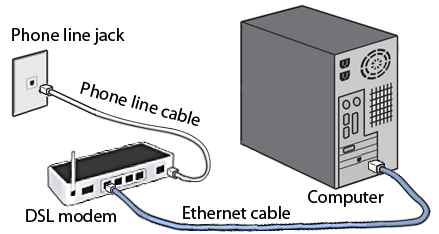
Dial-Up Connection. Dial-up connections uses telephone lines to connect to the internet. However, if you use the internet, the voice connection will not function, which is disadvantageous.


DSL.  This is an improved version of the dial-up connection, where even if the internet is connected, you can use the telephone.


Cable Internet. 


Wireless Internet.


Dedicated Line.

WEEK 2 Lesson 7: Online Platfoms for ICT Content Development


Social Media Platforms. Websites like Facebook allow you to create not only personal accounts but also pages and groups where you can share content. The only downside of this is that you are restricted to Facebook's "one-size-fits-all" design.


  • One-size-fits-all refers to something which is suitable for or used in all circumstances.  In this case, one-size-fits-all design refers to how Facebook does not allow you to customize everything in your page, except for certain parts such as display pictures, cover photos, privacy of your posts etc. This means that you cannot decide what layout to use in your page.
  • On the plus side, Facebook has billions of users. This makes it effective as a platform for content development, since more people will be able to view and share your page. 
  • Another example of a social networking site is LinkedIn, where its focus is on business and professional networking.
Blogging Platforms. Websites like WordPress, Tumblr, and Blogger focus on content and design. it typically looks like a newsletter where you are given options to change the design to your liking. Though you can manipulate the design, social medias popularity is still unrivaled. The amount of  customization in blogs is also unrivaled depending on the content management system implemented by the provider.


  • Just remember that blogging platforms offer more options in terms of customization. While blogging platforms are inferior to social media platforms in terms of popularity, it will depend on the owner of the page if he can make use of social media platforms to advertise his site.
Blogs, news, and shopping websites use CMS which stands for Content Management System. CMS is a computer application that allows you to publish, edit, manipulate, organize, and delete web content.


Friday, 29 September 2017

WEEK 1

Lesson 6: Imaging and Design for Online Environment

Lesson Objectives:
At the end of this lesson, the students should be able to:
  • understand the basic principles of graphics and layout
  • create a simple infographic using web tools;
  • understand and use several file formats used on the web;
  • easily manipulate images using a simple image editor; and
  • upload and share images using Photobucket.
Google is the most visited website in the world. Its mission statement is "to organize the world's information and make it universally accessible and useful."


Webpage Designing
Creating a web page is like creating a work of art. Here are the basic principles of graphics and layout.

Balance

"The visual weight of objects, texture, colors, and space which is evenly distributed on the screen."


There are two types of balance: symmetrical and asymmetrical.


Symmetrical balance is achieved when the image looks the same on either side of the photo. In the example above, we can see that if we split the image in the center vertically, the two photos would look the same.


Asymmetrical balance is achieved when elements are arranged in a photo to make it look balanced. In this picture, while the two elements in the picture (the tower and the moon) are not symmetrical (of course), they are arranged in a way which makes the photos look balanced in composition. 

Emphasis


"Giving an element stress to show importance"

Emphasis is utilized when you make an element stand out from the others. We can use colors, size, shape, and texture to emphasize an element in a website.

Movement


Movement is usually shown when you capture your subject mid-action, just like when an athlete is running and you capture that moment. We usually utilize movement to guide our viewer's eyes to our focal point, or the focus of the photo.

Pattern, Repetition and Rhythm

"These are the repeating visual elements on an image or layout to create unity in the layout or image."

Pattern and repetition usually refers to the elements which are repeated to appeal to the audience. Rhythm, however, gives a sense of movement, and is usually messy.

Proportion
Proportion is achieved when your elements relate well with one another. We should be able to use proportion to show a story or message with the elements we use.

Variety

In variety, we use different design elements to appeal to the viewers' eyes. In this photo, we use different colors to draw our viewers' attention.  When using variety in our webpage, be sure that it goes well with one another, or it will just look messy.

Infographics
Information graphics or infographics are used to represent information, statistical data, or knowledge in a graphical manner which is usually done in a creative way to attract the viewers' attention. 

The purpose of infographics are:
  1. To communicate a message
  2. To present a lot of data or info in a way that is compact and easy to comprehend.
  3. To analyze data in order to discover cause and effect relationships.
  4. To periodically monitor the rate of certain parameters.
3 Elements are utilized when creating infographics. These are:
  1. Visual elements. (Examples are Color coding and graphics)
  2. Content elements. (Time frames, statistics, references)
  3. Knowledge elements. (facts)
There are 5 types of infographics. These are:
  1. Cause and effect infographics
  2. Quantitative infographics
  3. Chronological infographics
  4. Directional infographics
  5. Product infographics


Piktochart.com is a free online app that allows you to create infographic. Here are the steps when creating infographics in Piktochart:

1. Create a Piktochart account. You can create one here.
2. Fill up the information on the sign up page or connect your Google+ or Facebook acounts.
3. Select a template for your infographic.
4. When the editor opens, select the blocks and input information as you see fit.
5. While editing, you can use various tools on the left side of the page. For more information, check p. 108 in your book.
6. Save your work by clicking Save on the top right of the page. 

Online Image File Formats 
When creating a website, you should consider your viewers' internet connection, so you should make sure that the image file format that you use is compressed for their convenience. The 3 most common image file formats used on the Web are as follows.

1. Joint Photographics Experts Group (.jpg or .jpeg)- Usually used for real life photographs and its high compression, this format can support 16.7 million colors and it is more portable and compatible in the Internet. However, it does not support transparency and animation.

2. Graphics Interchange Format (.gif) - This format is capable of displaying transparency and animation. Very useful when designing a webpage because it can support animation, which is very appealing to the viewer of your website.


3. Portable Network Graphics (.png)- This file format allows the control over the transparency level or opacity of the images. This format is also usually used in screenshots, because it can be transported on the internet at faster rates. However, it doesn't support animation and it can only display up to 16 million colors.


Wednesday, 27 September 2017

My Ambition in Life

I would like to be an programmer... is what I would like to say, but as of now, I don't know what I would like to be in the future. I am very confused as to what path to take. To be honest, I am not even thinking of what I would like to be. That is because I like to enjoy the freedom I have right now, and not be limited because I have already set my mind on doing one thing. I am still young, which means there are still a lot of possibilities for me to explore. I hope that at least before I finish SHS, I would be able to find a career or job which I could pour all my effort and passion in.

“Never underestimate the power you have to take your life in a new direction.” ― Germany Kent

Lesson 12: ICT Project for Social Change

At the end of this lesson, the students should be able to: Plan and conceptualize an ICT project for social change; and identify the plat...