People use HTML Codes to create pages and CSS codes to design them. If you have taken up these coding skills before, it will help you in creating pages using WYSIWYG. But if you have not, don't worry! WYSIWYG is designed for anyone who has not or does not have prior coding skills.
A webpage is a formatted page within a website that contains text, graphics, video and multimedia.
A homepage is the first webpage which usually provides information about the website, its purpose, and contents.
A splash page contains multimedia which is designed to be attractive and intriguing.
There are different ways to access the web.
Dial-Up Connection. Dial-up connections uses telephone lines to connect to the internet. However, if you use the internet, the voice connection will not function, which is disadvantageous.

DSL. This is an improved version of the dial-up connection, where even if the internet is connected, you can use the telephone.
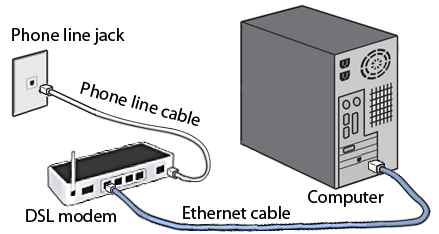
Cable Internet.

Wireless Internet.
Dedicated Line.

Web Browsers. Websites must be tested and viewed using browsers that are commonly used by users worldwide to assure that your website will work in majority of web browsers.
Examples of Web Browsers include:

Internet Explorer

Mozilla Firefox
Safari
Google Chrome

Netscape

Flock

Opera


No comments:
Post a Comment