Friday, 27 October 2017

Week 4: Lesson 9- Collaborative ICT Development

Week 3 was skipped coz it was long test week :D

Web Portal 

A web portal is a website that contains information from different sources and places them in one location in a uniform way.

The most popular examples of web portals are:

MySpace


Baidu
Wikipedia

Yahoo

Portals are made of portlets, which are interactive and dynamic. We can browse information by category through portlets.

Online Collaboration Tools

Online collaboration tools lets a group of people work together in real time over the Internet. Those engaged in online collaboration can work together on word processor documents, powerpoint presentations, and even brainstorming, all without being in the same room at the same time. 

There are plenty of collaboration tools online, such as:

  • Facebook groups
  • Wordpress
  • Google Drive and Microsoft Office Online
  • Microsoft's Yammer
  • Trello
To make sure that an online collaboration tool suits your needs, you need to consider the following:
  • Easy to use and set up. The interface should be understandable to all members, and easy to set up for your needs.
  • Features that will fit your purpose. The tool you will be using should have features that can be utilized by your team.For example, you can remind members of their deadlines with the online collaboration tool. 
  • Ability to upload documents. You should be able to share different documents for convenience. This will help team members who are far away from each other.
  • Security features.  These features ensure that your documents, information, and conversations will stay private and safe from people with malicious intent.
For further discussion about the security features, let us take a look at one of the online collaboration tools that we used for this lesson, Trello.

  • To join a board, you are either invited by the creator of the board through your Trello account or your e-mail. This makes sure that no one can just join your board.
  • You can also change the privacy settings of your board. This will make sure that not just anyone can see the information you post in your board
  • The data you upload is encrypted, which means that there is an additional layer of security applied on your data to prevent access from people who have malicious intents.







Friday, 13 October 2017

WEEK 2 Lesson 8

WYSIWYG is the acronym for What You See Is What You Get. This means that whatever you type, insert, draw, place, rearrange, and everything you do on a page is what the audience will see.

People use HTML Codes to create pages and CSS codes to design them. If you have taken up these coding skills before, it will help you in creating pages using WYSIWYG. But if you have not, don't worry! WYSIWYG is designed for anyone who has not or does not have prior coding skills.

A webpage is a formatted page within a website that contains text, graphics, video and multimedia.

A homepage is the first webpage which usually provides information about the website, its purpose, and contents.

A splash page contains multimedia which is designed to be attractive and intriguing.


There are different ways to access the web.

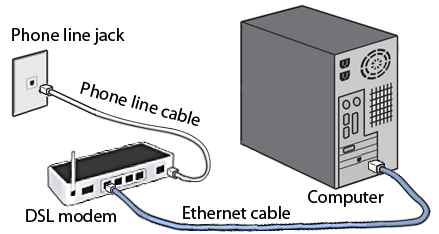
Dial-Up Connection. Dial-up connections uses telephone lines to connect to the internet. However, if you use the internet, the voice connection will not function, which is disadvantageous.


DSL.  This is an improved version of the dial-up connection, where even if the internet is connected, you can use the telephone.


Cable Internet. 


Wireless Internet.


Dedicated Line.

WEEK 2 Lesson 7: Online Platfoms for ICT Content Development


Social Media Platforms. Websites like Facebook allow you to create not only personal accounts but also pages and groups where you can share content. The only downside of this is that you are restricted to Facebook's "one-size-fits-all" design.


  • One-size-fits-all refers to something which is suitable for or used in all circumstances.  In this case, one-size-fits-all design refers to how Facebook does not allow you to customize everything in your page, except for certain parts such as display pictures, cover photos, privacy of your posts etc. This means that you cannot decide what layout to use in your page.
  • On the plus side, Facebook has billions of users. This makes it effective as a platform for content development, since more people will be able to view and share your page. 
  • Another example of a social networking site is LinkedIn, where its focus is on business and professional networking.
Blogging Platforms. Websites like WordPress, Tumblr, and Blogger focus on content and design. it typically looks like a newsletter where you are given options to change the design to your liking. Though you can manipulate the design, social medias popularity is still unrivaled. The amount of  customization in blogs is also unrivaled depending on the content management system implemented by the provider.


  • Just remember that blogging platforms offer more options in terms of customization. While blogging platforms are inferior to social media platforms in terms of popularity, it will depend on the owner of the page if he can make use of social media platforms to advertise his site.
Blogs, news, and shopping websites use CMS which stands for Content Management System. CMS is a computer application that allows you to publish, edit, manipulate, organize, and delete web content.


Lesson 12: ICT Project for Social Change

At the end of this lesson, the students should be able to: Plan and conceptualize an ICT project for social change; and identify the plat...